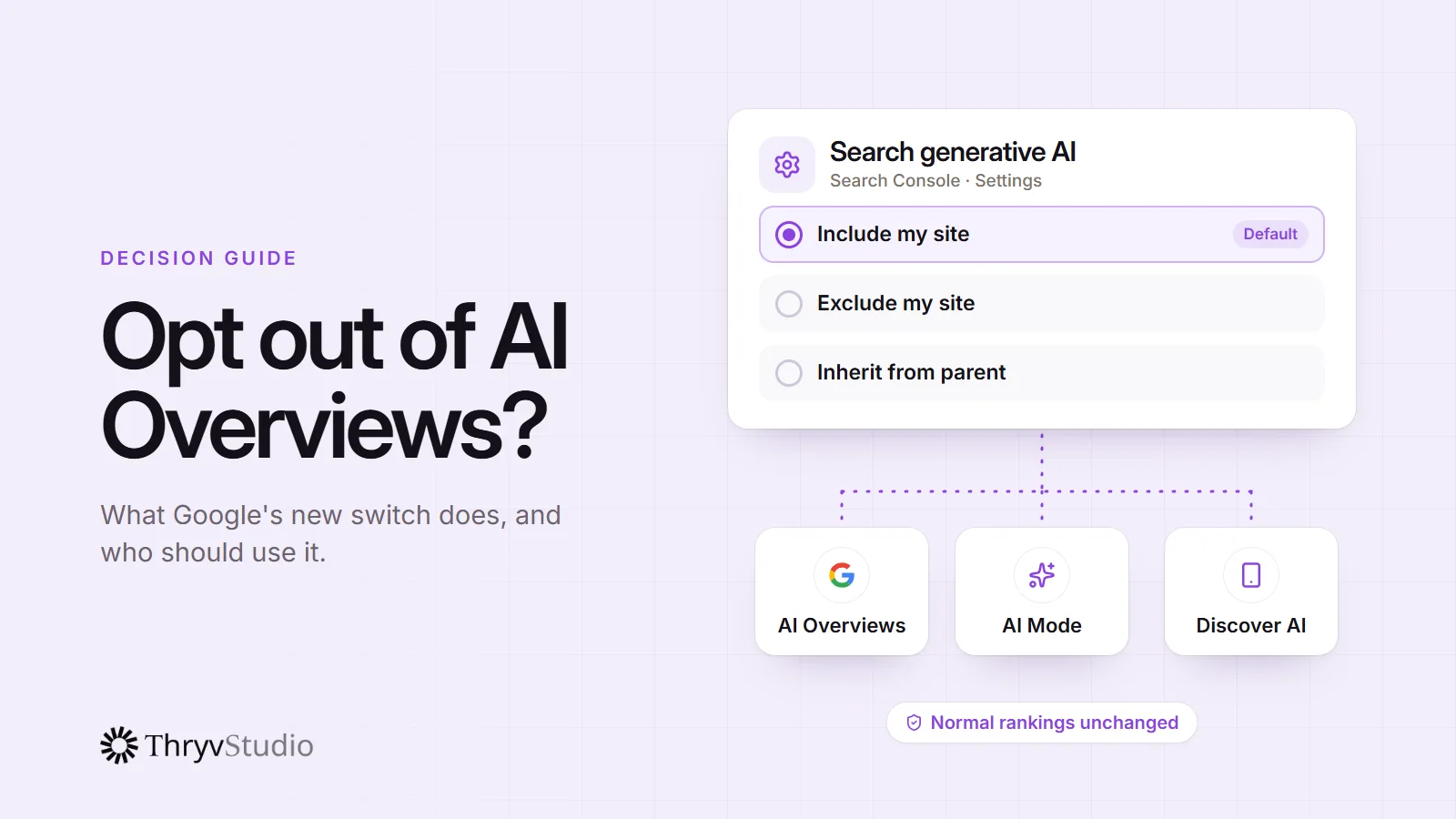
Google's Search generative AI control lets any site owner remove their site from AI Overviews, AI Mode and generative AI features in Discover, from Settings in Search Console. It became available to all websites worldwide on August 31, 2026, after the UK's competition regulator required Google to offer it. Opting out removes your links and content from those features but doesn't affect your rankings in the rest of Search. For most businesses that want customers, staying in is the better choice. Opting out makes sense mainly for publishers whose content is the product, and it is best tested on one section first.
Should you opt out of AI Overviews?
For most businesses, no. If your site exists to win customers, AI Overviews and AI Mode are places where people now meet brands for the first time, and opting out removes you from them while your competitors stay. The case for opting out is strongest when your content itself is what you sell, such as a publisher, a paid research firm or a licensed database, and AI summaries are taking value you would otherwise be paid for.
The decision is now a real one. Since August 31, 2026, every site can switch off its presence in Google's AI features in a few clicks. This guide explains what the switch does, what it doesn't do, how it compares with older controls such as Google-Extended and nosnippet, and how to test it without risking your whole site.
What is the Search generative AI control?
The Search generative AI control is a setting in Google Search Console that decides whether your site can appear in Google's generative AI features. According to Google's help article for the control, it currently covers:
- AI Overviews
- AI Mode
- Generative AI features in Google Discover
Google says it expects to update this list over time. You'll find the control under Settings > Search generative AI in Search Console. It has three options:
| Option | What it means | Default? |
|---|---|---|
| Include my site's links and content | Your pages can appear as links and help ground AI responses. You can get impressions and traffic from these features. | Yes, for most properties |
| Exclude my site's links and content | Your pages won't be shown or linked in these features, or used to ground their answers. You get no traffic or impressions from them. | No |
| Inherit control from parent | The property follows the setting of its parent property, such as the domain. | Yes, if the property has a parent |
"Grounding" here means using your page as a source the AI draws on when it writes an answer. Excluding your site stops both: your link won't appear, and your content won't be used to write the answer.
Why Google added an opt-out
Google added the switch because a regulator required it. On 3 June 2026, the UK's Competition and Markets Authority imposed a conduct requirement on Google search under the UK's digital markets regime. The CMA called it "a world first": publishers would be able to opt out of their content being used to power AI features in Google search. The same requirement covers attribution of publisher content in AI results, and the CMA said it is monitoring how Google implements it.
Google launched its new generative AI performance reports in Search Console the same day, and started testing the control with a small group of sites. Google's help article now says the control has been rolled out to all websites worldwide as of August 31, 2026. So although the rule came from the UK, site owners everywhere can use it.
Before this, there was no clean way out. You could hide snippets with nosnippet, which also stripped your descriptions from ordinary results, or leave Google entirely with noindex. The new control is the first that targets AI features alone.
What happens when you exclude your site
Google's help article sets out the effects. In plain terms:
- Your links disappear from AI features. Your pages won't be linked in AI Overviews, AI Mode or Discover's AI features.
- Your content stops shaping the answers. Content crawled from your site can't be used to generate an AI response or preview in those features.
- The AI answer may still look like yours. Google notes that content from other sites will still be available, "and it may appear similar to yours". The AI Overview doesn't go away; it is written from other sources.
- Your rankings elsewhere don't change. Google says the control "isn't used as a ranking or inclusion signal affecting other parts of Search". Your blue links stay where they are.
- It doesn't stop AI training. To limit training of the models behind these features, Google points you to Google-Extended, a separate control.
- Some use continues. Google says your content may still help power Search as a whole, for example helping its systems understand the language of searches and pages.
- It isn't instant. Google says exclusion generally takes a few days. Most content is removed within one to two days, but caching can make some take longer.
- It can be reversed. You can switch back to Include at any time.
The opt-out vs Google-Extended, nosnippet and noindex
People mix up these controls constantly, and the wrong choice can cost a lot of traffic. Here is what each one does, based on Google's own documentation:
| Control | Out of AI features? | Changes normal results? | Scope |
|---|---|---|---|
| Search generative AI control (Search Console settings) | Yes | No | A whole property, such as a domain or folder |
| Google-Extended (robots.txt) | No | No | Gemini apps and Vertex AI training and grounding only |
| nosnippet (robots meta tag or X-Robots-Tag) | Limits what can be shown | Yes: no text snippet in any result | One page |
| data-nosnippet (HTML attribute) | Hides that part only | Yes, for that part | Part of a page |
| max-snippet (robots meta tag) | Limits how much text is used | Yes | One page |
| noindex (robots meta tag or HTTP header) | Yes, because the page leaves Google | Yes: the page leaves Google entirely | One page |
The most common mistake is blocking Google-Extended in robots.txt and assuming it removes a site from AI Overviews. It doesn't. Google's crawler documentation says Google-Extended manages whether content can be used to train future Gemini models and to ground answers in the Gemini apps and Vertex AI. It "does not impact a site's inclusion in Google Search". AI Overviews and AI Mode are part of Search, so they are controlled by Googlebot and the settings above.
The second mistake is reaching for noindex. It works, but it removes the page from Google completely, blue links included. For almost every business, that costs far more than it saves.
nosnippet sits in between. Google's guide to AI features and your website lists nosnippet, data-nosnippet, max-snippet and noindex as the ways to limit what's shown from your pages in Search. They work page by page, but they also affect how your page looks in ordinary results, which usually lowers clicks. Use them for specific pages or passages, not as a site-wide AI opt-out.
You can check what your robots.txt allows each Google crawler to do with our free robots.txt checker, and see a page's robots meta tags with the meta tag checker.
Who should opt out, and who shouldn't
The question to ask is simple: do you make money when people read your content, or when people find your business?
| Type of site | Usually | Why |
|---|---|---|
| Local service business (plumber, dentist, law firm) | Stay in | AI answers often name or link to providers. Being absent hands that moment to competitors. |
| B2B and SaaS company | Stay in | Buyers research with AI. Being cited builds the shortlist even when nobody clicks. |
| Ecommerce store | Stay in | AI Mode and AI Overviews increasingly shape product research and comparisons. |
| Blog that earns from ads | Test carefully | Lost pageviews cost money, but so does losing citations that bring readers. |
| News publisher | Consider it | Summaries can replace visits; the opt-out may also support licensing talks. |
| Paid research, data or courses | Consider it | Your content is the product, and summaries give it away. |
Two cautions before you decide.
First, opting out doesn't remove the AI answer. Google writes it from other sources instead. If your information is widely available elsewhere, searchers may get nearly the same answer, just without your name on it.
Second, being cited has value even without a click. A brand that appears in an AI Overview is seen by everyone who reads that answer. People who meet you there may search for you by name later. That value is real, even though it is hard to measure.
How to decide: the opt-out test
Don't guess. You can measure your current exposure, then test the switch on one section of your site before touching the rest.
Step 1: Measure what AI features give you now
Open the generative AI performance report in Search Console and export impressions by page for the last three months. Then export clicks and impressions for the same pages from the main Performance report. Our guide to tracking AI Overviews in Search Console shows how to combine the two and spot pages where AI exposure is high and clicks are falling.
If very few of your pages appear in AI features, opting out changes little either way. If many do, keep going.
Step 2: Pick one section to test
The control follows a parent and child structure, and that makes careful testing possible. A URL-prefix property for one folder, such as https://example.com/blog/, inherits the setting from its parent, such as the domain property example.com, unless someone overrides it. The owner of the child property can switch only that folder to Exclude, and the rest of the site stays in.
So add a URL-prefix property for the section you want to test, if you don't already have one, and exclude only that property. Choose a section with steady traffic, so changes are easy to see.
Step 3: Wait, then compare
Allow a few days for the change to take effect, then give it several weeks. Compare that section's clicks in the Performance report, and its leads or revenue in your analytics, with the same period before the change and with the rest of the site. Watch branded searches too, in case fewer people come looking for you by name.
Step 4: Decide, and write it down
If clicks and conversions held up or rose, you have evidence for opting out more widely. If they fell, switch the section back to Include. Either way, note the date and the result. Google says it will update which features the control covers, so check again when that happens.
How to opt out of AI Overviews, step by step
- Sign in to Search Console and open the property you want to change. To cover the whole site, use the top-level domain property.
- Go to Settings, then Search generative AI.
- Choose "Exclude my site's links and content from Search generative AI features."
- Check child properties. Child properties inherit the parent's choice unless their owners override it. Owners of the top-level domain property see a notice when a child property overrides the parent setting.
- Wait a few days, then check the generative AI performance report. Impressions should fall towards zero.
To undo it, return to the same page and choose Include, or set a child property back to Inherit.
How to turn off AI Overviews in your own searches
Many people who search for "how to turn off AI on Google", how to disable AI Overviews or how to remove AI from Google search aren't site owners. They just don't want AI answers in their own results. The Search Console control doesn't help with that, because it only changes where your site appears.
Google's AI Overviews help page says AI Overviews are a core Search feature, like knowledge panels, and can't be turned off. What you can do is choose the Web filter after you search. It shows only text links, without features like AI Overviews. Turning off "AI in Search" in Search Labs only stops experimental features; it doesn't remove AI Overviews from normal results.
Common mistakes
- Blocking Google-Extended to escape AI Overviews. It controls Gemini training and grounding, not Search features.
- Using noindex as an AI opt-out. It removes the page from Google completely.
- Forgetting inheritance. Changing a URL-prefix property doesn't affect the domain, but changing the domain affects every child that inherits.
- Expecting the AI answer to vanish. Google will still answer from other sources.
- Judging after two days. Exclusion takes a few days to apply, and traffic needs weeks to show a real pattern.
- Opting out without a baseline. Without before-and-after numbers, you can't tell whether the change helped.
Frequently asked questions
Can I opt out of AI Overviews?
Yes. Since August 31, 2026, any site owner can open Search Console, go to Settings, then Search generative AI, and choose to exclude their site. It removes your links and content from AI Overviews, AI Mode and generative AI features in Discover.
Does opting out of AI Overviews hurt my rankings?
Google says no. The control isn't used as a ranking or inclusion signal for other parts of Search, so your normal results stay as they are. You do lose any impressions and clicks that came from AI features.
Does blocking Google-Extended remove my site from AI Overviews?
No. Google-Extended controls whether your content is used to train Gemini models and ground answers in the Gemini apps and Vertex AI. Google says it doesn't affect inclusion in Google Search, and AI Overviews are part of Search.
Can I opt out only some pages?
Yes, in two ways. You can exclude a single section by setting the control on a URL-prefix property for that folder. For individual pages or passages, nosnippet, data-nosnippet and max-snippet limit what Google can show, but they also affect your normal search snippets.
How long does it take to opt out?
Google says it generally takes a few days. Most content is excluded within one to two days, but caching can make some take longer.
Does opting out stop Google training AI on my content?
No. Google says the control doesn't affect AI training. Use Google-Extended in robots.txt to limit training of the models behind these features.
How do I turn off AI Overviews on Google?
As a searcher, you can't switch them off completely. Google says AI Overviews are a core part of Search. Choose the Web filter after searching to see only text links.
Is SGE the same as AI Overviews?
Mostly, yes. Search Generative Experience (SGE) was the Search Labs experiment that Google turned into AI Overviews in 2024. The name "Search generative AI" in Search Console refers to AI Overviews, AI Mode and Discover's AI features together.